Argus Tricks
Leasing Commissions-Pro Fee + Free Rent
When calculating the Pro Fee, the software takes 1st Month’s NET of free rent; therefore, if a tenant has free rent during the first month of the term, Argus calculates $0 as the Pro Fee.
Workaround: Model Free Rent beginning in Month 2 of Term to properly account for Pro Fee.
Changing Recovery Methods
Reimbursement methods cannot be changed during the lease term.
Workaround: A dummy “option” term must be modeled with the new reimbursement method applied to the “option” term.
Percent of Other
Percent of Other (Line) function for Revenues/Expenses/Capital has many uses that allows you to link said item to effectively any line item(s) in the Cash Flow down to the tenant-level in most cases. Additionally, this function can be utilized in tandem with Tenant Groups or Expense Groups.
- Example- Tenant Group: If User needed a Management Fee that was 3% of Base Rent for Retail Tenants only, User could create a Retail Tenants tenant group which could then be referenced in lieu of having to select every Retail Tenant in the expanded Cash Flow. In the event the Retail Tenant population changed, a simple update of the tenant group would be flow through to the Management Fee calculation without any additional updates.
- Example- Expense Group: When creating a Base Year cap, User must utilize Percent of Other in order to select the capped expenses. In lieu of selecting each expense, User can create a “#REF-Tenant A- Capped Expenses” expense group and make the expense line 100% of that expense group. This allows for User to update/manage the capped expense lines more effectively and leaves less room for user-error.
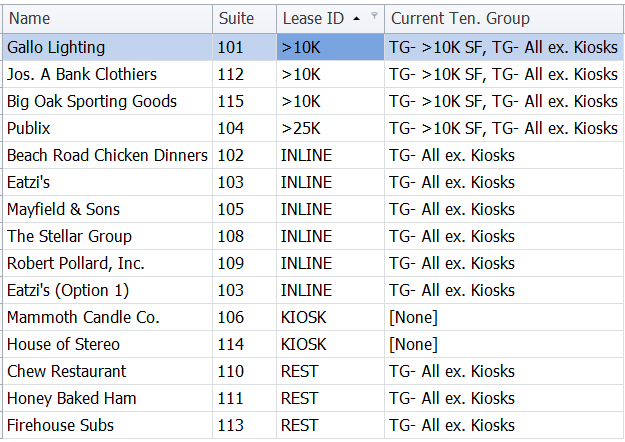
Lease ID
This little used column in the Rent Roll can be utilized as an additional user-defined field for to aid with identifying subpopulations, sorting, and grouping the tenants without impacting the projection.It is especially useful as this field is shown in other modules such as Tenant Groups where it can aid in quickly updating/modeling specific Tenant Groups based on some category that is not readily identified in the Rent Roll. Note: This field has to be turned “on” via “Modeling Policies” on the Tenants tab. See example below: